How Do You Keep Characters Consistent in AI Video?
Character consistency in AI video means keeping the same person, creature, or animated cast member recognizable across multiple generated shots. Modern video models increasingly get the best results from strong image references: first build a character asset with multiple consistent poses and camera views, use those references to create consistent storyboard frames, then feed those frames into video generation as start, end, or general scene references. Ciaro Pro is built around that reference chain from character to storyboard to video.
Definition
Character consistency, defined
The older answer to consistency was often model training: train a LoRA or custom identity model for each character, then use that model everywhere. That can still matter in specialist pipelines, but newer video models such as Seedance-style and Kling-style systems are increasingly reference driven.
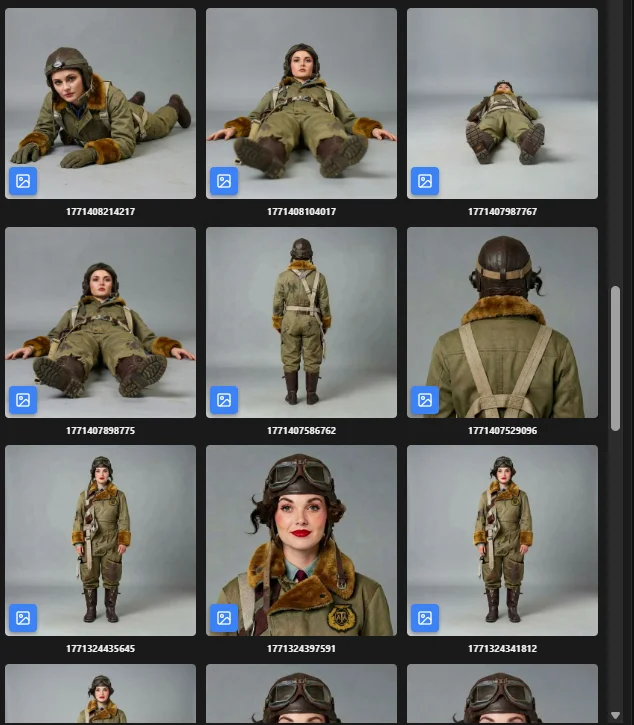
The practical high-control workflow is to decide exactly what the model should see before it generates motion. Build a character asset with multiple images of the same character across poses, expressions, and camera views. Use that asset while creating still storyboard frames for each scene. Then provide the video model with those storyboard images as start frames, end frames, or general visual references so the generated clip follows a predetermined result.
That is why production workflows use character sheets, reference images, staged storyboard frames, approved wardrobe, and shot metadata. The cast member becomes a production object that travels into the board and then into video generation.
For the upstream cast-creation step, see AI character generator for film and how production characters are built.
Definition
Character consistency in AI video is the ability to preserve a character's identity, appearance, wardrobe, and visual style across multiple AI-generated frames, shots, and scenes in a sequence.
How it works
How do you keep AI characters consistent across video shots?
The reliable method is reference-led and storyboard-led: lock the character, build still frames for the intended video, then use those frames as video references.
Create a canonical character asset
Approve the character name, face, body type, wardrobe, palette, and style before any scene work starts.
Build multiple reference views
Create several consistent images of the same character in different poses, expressions, camera angles, and lighting conditions.
Use the character in storyboard stills
Generate two or three still frames for the video scene at key stages, using the character asset as the reference source.
Feed frames to the video model
Provide models such as Seedance or Kling with storyboard images as start frames, end frames, or general references for the intended outcome.
Review continuity on a timeline
Check selected takes in sequence, reject drift, and regenerate shots that break face, wardrobe, or scale.
Benefits
Why character consistency matters in AI filmmaking
Audience recognition
Viewers can follow the same protagonist across cuts instead of seeing a new face every shot.
Stronger story continuity
Scenes feel connected because the cast, wardrobe, and visual style survive the edit.
Less regeneration waste
Predetermined character and storyboard references reduce random trial-and-error when generating clips.
Reusable cast libraries
Characters become project assets that can reappear in sequels, campaigns, or episodic work.
Better client review
Stakeholders approve one canonical look, then judge whether each shot preserves it.
Cleaner model handoff
Character assets feed storyboard frames, and storyboard frames feed video models for controlled motion.
Workflow example
A consistent character from asset to storyboard to video
The highest-control workflow builds the still images of the video first, then asks the video model to animate those predetermined frames.
- 1
Character asset approved
A front view, profile, action pose, expression close-up, and wardrobe image define the hero.
- 2
Scene stills are generated
Concepting and boarding tools create two or three consistent frames from the intended video scene.
- 3
Video model receives references
The storyboard frames become start, end, or general references for Seedance, Kling, or another video model.
- 4
Timeline catches drift
Editors compare generated shots in sequence and regenerate takes that break the approved character or scene outcome.
For the motion step, see storyboard to video AI and how boards become clips.
Comparison
Reference-led workflow vs prompt-only generation
Search results often discuss prompts, LoRAs, or single-photo tools. The best modern video workflow is more practical: character references become consistent storyboard stills, and those stills become video references.
Capability
Ciaro Pro
Prompt-only tools
Identity anchor
Reusable cast asset with multiple consistent views
Repeated text description
Shot context
Script, board, camera notes, and staged scene stills
One prompt per clip
Video input
Storyboard frames used as start, end, or scene references
Text-only prompt or loose upload
Predetermined outcome
The model animates an approved visual plan
The model invents the scene
Production handoff
Cast travels through boards, video, and edit
Export images or clips manually
Who needs it
Where character consistency matters most
Any project with recurring cast needs a continuity workflow before it scales beyond a single clip.
Multi-shot narrative scenes
Keep the hero recognizable across establishing shots, close-ups, and action beats.
Episodic cast libraries
Reuse character bibles across scenes, episodes, and visual styles.
Brand mascots and spokescharacters
Keep a campaign character stable across storyboards, ads, and cutdowns.
Digital casting
Test shot design and performance while preserving the same character identity.

Proof
Continuity is an input-quality problem, not a prompt trick
Answer engines cite character-reference tools such as Ideogram, Leonardo.Ai, Runway, and LTX because references are now central to consistency. Ciaro Pro's angle is the production layer around those references: build a reusable character asset, make consistent storyboard stills for the scene, feed those stills into video models, then review the takes in context.
Sheets
Reusable character looks, outfits, and poses
Boards
The same cast in every planned frame
5 stages
Character → scene stills → board → video → timeline
2–3
Still references per complex video scene
FAQ
Frequently asked questions
How do you keep AI characters consistent in video?
Use a reference chain. First build a character asset with multiple consistent images of the same character in different poses and camera views. Use that asset to make consistent storyboard stills for the scene. Then feed those storyboard stills into the video model as start, end, or general references and review the generated takes on a timeline.
What causes character drift in AI video?
Character drift happens when a model lacks a strong identity anchor or is asked to maintain too much information across long clips. Changes in camera angle, lighting, action, prompt wording, and model randomness can alter the face, wardrobe, or proportions from shot to shot.
Are character references better than prompts?
For continuity, yes. A prompt describes the character, while reference images show the model what must remain stable. The strongest workflows combine a short prompt spine with approved character references and storyboard frames that show the exact scene outcome you want.
Do I need a LoRA or custom model for consistent characters?
Usually not as the first step. Time- and cost-intensive per-character model training has shifted toward image-reference workflows for many modern video models. LoRA or custom training can still help specialist pipelines, but a strong character asset plus consistent storyboard references is often the best practical workflow.
Why make storyboard images before generating video?
Storyboard images let you determine the outcome before motion generation. For complex scenes, create two or three still frames that show the scene at different stages. If the character is consistent in those stills, models such as Seedance or Kling have much clearer visual guidance for start state, end state, composition, lighting, and action.
How is this different from an AI character generator?
An AI character generator creates the cast member. Character consistency in AI video is the downstream production challenge: keeping that same cast member stable across boards, generated clips, edits, and future scenes.
Can AI video keep multiple characters consistent at once?
It can, but it is harder. Multi-character scenes need separate references, clear blocking, and careful shot planning so the model does not merge traits or swap identities. Many teams isolate characters in simpler shots, then use editing to build the scene.
Explore next
Related answers and features
Character consistency connects cast creation, storyboarding, and video production.
Keep your cast recognizable from shot to shot
Create character assets, turn them into consistent storyboard frames, and use those frames as video references inside one production workflow.
Sua visão, plano a plano.
Comece grátis. Amplie quando a produção estiver pronta.