What Is the Difference Between AI Filmmaking and One-Prompt Video Generation?
One-prompt video generation asks a model to create a clip from one instruction. AI filmmaking uses generation inside a larger, director-led workflow: script, scene breakdown, shot planning, storyboards, recurring assets, multiple generated takes, editing, sound, review, and delivery. Use one-prompt generation when one self-contained clip is enough; use an AI filmmaking workflow when shots must connect into a coherent finished video.
Direct answer
A generated clip is an output; a film is a production
The distinction is not about whether prompting is useful. Every AI film may contain prompted shots. The difference is where the creative decisions live: inside one request interpreted by a model, or across a production plan controlled by the filmmaker.
Current video models still commonly generate short clips. Longer work therefore has to be designed as scenes and shots, generated in pieces, evaluated in context, and assembled with picture and sound. That production layer is what turns generative footage into a film, commercial, episode, or finished sequence.
For the broader definition, see what AI filmmaking includes from development through final delivery.
Definition
AI filmmaking versus one-prompt video generation is the difference between directing a multi-stage production and requesting a single generated result. A prompt can describe one shot, but a filmmaking workflow controls how every shot serves the script, matches adjacent shots, and works in the final edit.
How it works
How does a structured AI filmmaking workflow work?
The workflow breaks a creative brief or script into controllable production decisions before expensive video generation begins.
Define the finished piece
Set the story, audience, runtime, format, visual approach, and delivery requirements before choosing individual shots.
Break the story into scenes and shots
Turn the script into beats, coverage, camera angles, actions, and transitions that can each be generated and reviewed.
Lock reusable references
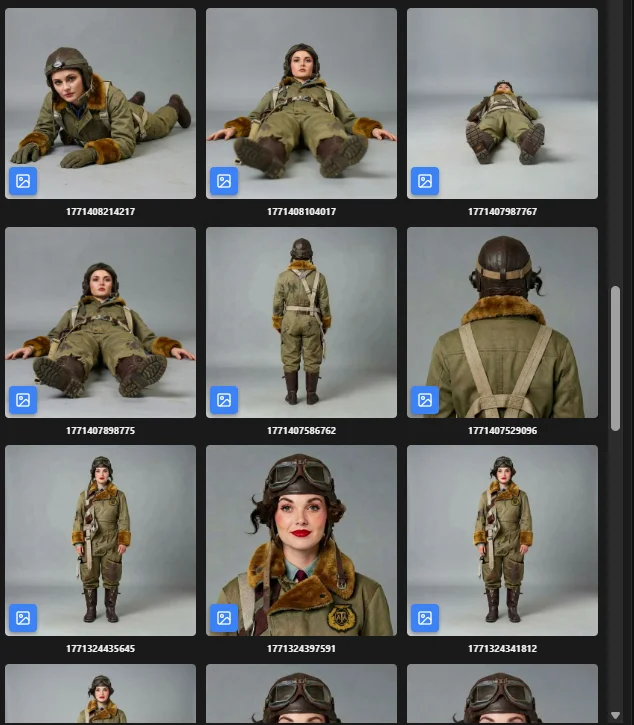
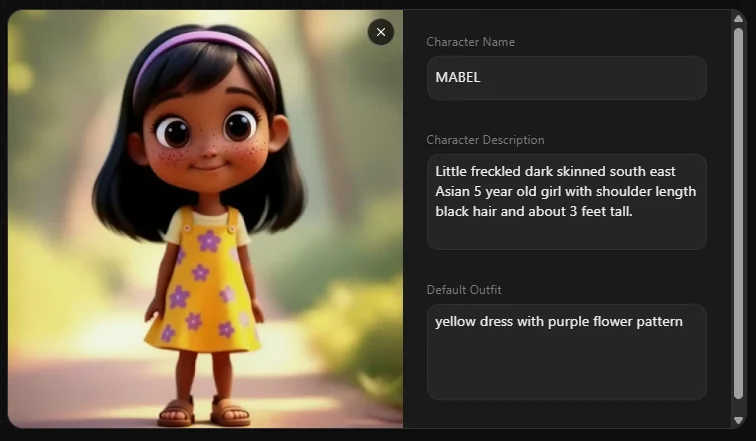
Approve characters, locations, props, wardrobe, and style references so separate generations belong to the same visual world.
Generate and select takes
Use the right model and references for each shot, compare variations, and keep only takes that serve the sequence.
Edit, sound, review, and deliver
Assemble shots on a timeline, refine pacing and continuity, add dialogue, music, and sound, then review and export the finished work.
Why workflow matters
What a production workflow adds beyond a single prompt
Story control
Every generated shot has a defined purpose in the scene instead of being judged only as an impressive standalone clip.
Continuity
Approved references help preserve characters, wardrobe, locations, props, lighting, and style across separate shots.
Editorial choice
Multiple takes can be compared in sequence, trimmed, reordered, replaced, and shaped around performance and pacing.
Predictable iteration
Teams can revise a specific shot or production decision without asking a model to reinterpret the entire video.
Team review
Writers, directors, artists, editors, agencies, and clients can approve the same script, boards, assets, and cut.
Professional delivery
The result can be finished with sound, subtitles, versions, technical export settings, and a traceable asset history.
Example
One scene: one prompt or a directed sequence?
Imagine a character entering a station, spotting a pursuer, and escaping onto a train. One prompt may attempt the whole event. A film workflow designs it as editable coverage.
- 1
Establish the station
A wide shot establishes geography, time of day, the character, and the train platform.
- 2
Reveal the threat
A character point-of-view and reaction shot make the pursuer clear to the audience.
- 3
Build the escape
Several action shots preserve screen direction and increase pace as the train begins to move.
- 4
Shape the scene in the edit
The editor chooses takes, controls duration, adds sound, and replaces any shot that breaks continuity.
See how approved frames become controlled shots in a storyboard-to-video AI workflow .
Comparison
AI filmmaking workflow vs one-prompt video generation
Neither method is universally better. The right choice depends on whether you need a quick standalone result or a controllable multi-shot production.
Production question
AI filmmaking workflow
One-prompt generation
Primary output
Finished sequence, film, episode, or campaign asset
One generated clip or draft
Creative input
Script, breakdown, shot plan, boards, references, and edit decisions
Prompt with optional image or media input
Unit of control
Scene, shot, take, asset, track, and version
The complete request and returned clip
Continuity
Managed across cast, locations, style, geography, action, and sound
May be coherent within one clip but is not a cross-shot system
Revisions
Replace or refine a specific shot while preserving the sequence
Regenerate and let the model reinterpret the request
Editing
Built around selection, timing, transitions, dialogue, music, and sound
Often ends when the generated clip is accepted
Best fit
Narrative, episodic, branded, collaborative, or client-reviewed work
Ideation, mood tests, social snippets, and self-contained shots
Choose the right method
When is one prompt enough—and when do you need a workflow?
Use the lightest process that still gives you control over the result you must deliver.
Use one prompt for rapid exploration
Test a visual idea, atmosphere, movement, or self-contained clip when continuity with other shots does not matter.
Use a workflow for narrative sequences
Plan coverage and preserve character, world, action, and story continuity across many generated shots.
Use a workflow for reviewable deliverables
Connect the brief to boards, approved assets, revisions, aspect-ratio versions, and the final client-ready edit.
Use a workflow for recurring production
Carry approved characters, locations, styles, and production decisions into later scenes and episodes.
Evidence
Why AI films are still built shot by shot
Leading video models produce short generation units, while their own longer-form guidance moves creators toward storyboards, individual shots, and editing. The model makes footage; the production workflow makes the finished piece.
2-10 sec
Runway Gen-4.5 generation duration
4/6/8 sec
Google Veo 3.1 generation lengths
Shot by shot
Recommended structure for longer work
One cut
Where separate takes become a finished story
FAQ
Frequently asked questions
Is AI filmmaking the same as AI video generation?
No. AI video generation creates footage from text, images, video, or other inputs. AI filmmaking uses that footage inside a broader process that also includes writing, shot planning, storyboards, continuity, editing, sound, review, rights, and delivery.
Can one prompt generate an entire film?
A model may produce a short, self-contained video from one prompt, and capabilities continue to improve. But a controllable film with multiple scenes, recurring characters, deliberate coverage, pacing, sound, and revisions is still best managed as a sequence of planned shots rather than one indivisible request.
When should I use one-prompt video generation?
Use it for ideation, mood exploration, a visual test, a background plate, or a short clip that does not need to match a larger sequence. It is also useful early in development when speed matters more than precise continuity.
Why not put an entire scene into one long prompt?
A prompt can describe several actions, but it gives you limited control over coverage, timing, performance, continuity, and revisions. Breaking the scene into shots lets you approve composition, regenerate only what fails, and control meaning through the edit.
Do AI filmmakers still need scripts and storyboards?
For multi-shot work, usually yes. Scripts define story and dialogue; storyboards turn scenes into framing, coverage, action, and visual references. They also let teams review the sequence before spending credits on final video generations.
Does a workflow reduce AI generation costs?
It can reduce wasted generations by approving story, shots, and references before motion is generated. It does not guarantee a lower total cost: more ambitious productions may require many takes, specialist work, sound, editing, and quality control.
How does Ciaro Pro support AI filmmaking?
Ciaro Pro connects script development, scene and shot planning, storyboards, reusable characters and assets, AI video generation, timeline editing, collaboration, and export inside one production project.
Explore next
Build the workflow around the prompt
Go deeper into the planning, continuity, generation, and editing stages of AI filmmaking.
Direct the production, not just the prompt
Connect your script, shots, storyboards, recurring assets, generated takes, and final edit in one AI filmmaking workspace.