Finish sequences, not one-off clips
Plan scenes, approve boards, generate with context, keep assets consistent, and cut the timeline in one project—for teams that deliver sequences, not isolated files.
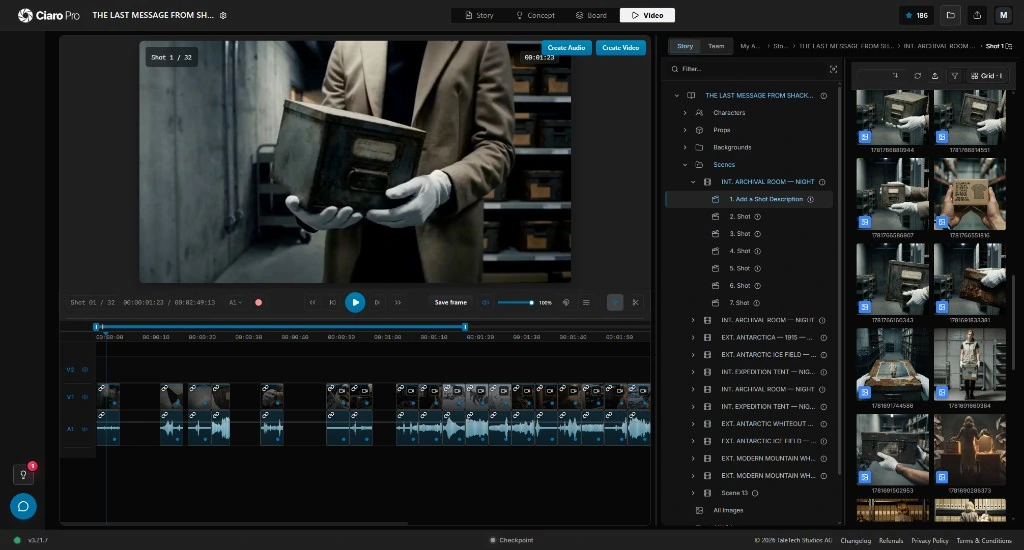
A production workspace showing screenplay scenes, shot cards, storyboard frames, generated takes, reference assets, review status, and a timeline ready for export.
Production, not clips
Professional video production still needs structure around AI
AI video generation is fast, but production teams still run on fundamentals: screenplay structure, shot planning, boards, cast and location references, take review, timeline editing, and client-ready delivery.
When those stages live in separate apps, every new generation starts from scratch. Producers rebuild shot context, directors lose framing intent, and editors receive clips with no link back to the scene or board that authorized them.
Ciaro Pro treats AI video production as a production job: each shot carries its script beat, board frame, references, takes, and edit placement until the sequence is approved for export.
For how script, boards, and edit fit together, see the AI film production overview for professional filmmaking teams.



Plan before you generate
Lock scene structure, coverage, and storyboard frames before any model spend so generation serves a reviewed shot—not a one-off prompt.
Generate with shot context
Run image-to-video from approved boards, character sheets, and location references so each take inherits the production decision behind it.
Finish inside the project
Compare takes against the board, assemble the timeline, adjust pacing, and export reviewable sequences without exporting context to another NLE first.
Workflow
From script to a reviewable master
Screenplay, boards, generation, asset libraries, editorial review, and export live in one project built for multi-shot deliverables.
Most productions still approve the board before they generate motion. See storyboard to video AI for that board-to-shot step.
Develop the script
Write or import screenplay material with scenes structured for downstream shot planning and production status.
Plan scenes and shots
Break coverage into shot cards with camera intent, character action, and notes reviewers can sign off before boards.
Storyboard the sequence
Create board frames that make pacing, composition, and continuity visible before any video generation budget is spent.
Manage production references
Attach characters, locations, props, and style references to the shots that need them—not to a disconnected media folder.
Generate AI video
Produce clips from planned frames and references so each take can be judged against the board and shot notes.
Review and edit takes
Select usable clips, place them on the timeline, refine rhythm, and keep script and board context visible during editorial decisions.
Export and iterate
Deliver reviewable sequences or return to the same shot context for another generation pass without rebuilding prompts.
Production platform
Built for multi-shot productions
AI video production workflow
Script-linked scene and shot planning
Storyboard approval before generation queues
Shot status from draft through export
AI video creation platform
Image-to-video from approved board frames
Multi-model generation with shot references
Take comparison against planned composition
Production asset management
Character, prop, and location libraries per project
References attached to shots—not global prompts
Versioned media for generated and imported assets
Editing and delivery
Timeline assembly for scenes and episodes
Review-ready sequence exports
Editorial finish before handoff to specialist NLEs
Who it's for
When the deliverable is a sequence, not a clip
Ciaro Pro works for directors, producers, animation leads, and agencies shipping scenes, trailers, episodes, pitch films, or campaign cuts.
Storyboarding, asset continuity, generation, and timeline editing live in one place so creative direction stays visible from the first scene card through export.

Continuity
Keep shot context attached to every generated clip
Generations fall apart when they forget the screenplay beat, board frame, and cast references that authorized them. Ciaro Pro stores that context per shot so review, regeneration, and timeline placement stay grounded in the plan.
One connected production
Script, shots, boards, generated clips, and the edit timeline
Script
Shots
Boards
Video
Timeline
A shot-level production view: screenplay scene, storyboard frame, reference assets, generated takes, review notes, and timeline placement for one clip.
Ciaro Pro vs clip tools
Production software with an NLE—not another generator tab
Prompt-based AI video tools are fast for clip tests. They rarely support screenplay structure, shot approval, asset libraries, take review, or sequence editing—the work professional teams need to deliver.
In Ciaro Pro the model is one stage, not the product: story planning, boards, references, generation, editorial assembly, and export live in one project.
For a concise definition and comparison criteria, read what AI video production software is for definitions, benefits, and comparison criteria.
Capability
Ciaro Pro
Typical generator
Script and scene planning
Native workflow stages
Usually external
Storyboard to video
Approved frames drive generation
Manual upload flow
Asset continuity
References attached to shots
Rebuilt prompt by prompt
Timeline editing
Built-in sequence assembly
Handled elsewhere
Production status
Track shot progress to export
Clip library only
Best fit
Films, episodes, sequences, pitch videos
Standalone clips

Proof
A finished animated episode from one production
Biome Brigade Episode 1 moved through script, storyboard planning, AI-assisted shots, and final edit inside Ciaro Pro—a 4-minute episode produced in under four weeks by a lean operator. It demonstrates production-grade output, not clip experiments.
Explore next
Related production pages
Go deeper on board-to-motion, director-led filmmaking, the production workspace, pricing, or a finished episode.
Production guides
Understand the workflow before choosing a tool
Concise guides explain the production decisions behind this workflow and where each step fits.

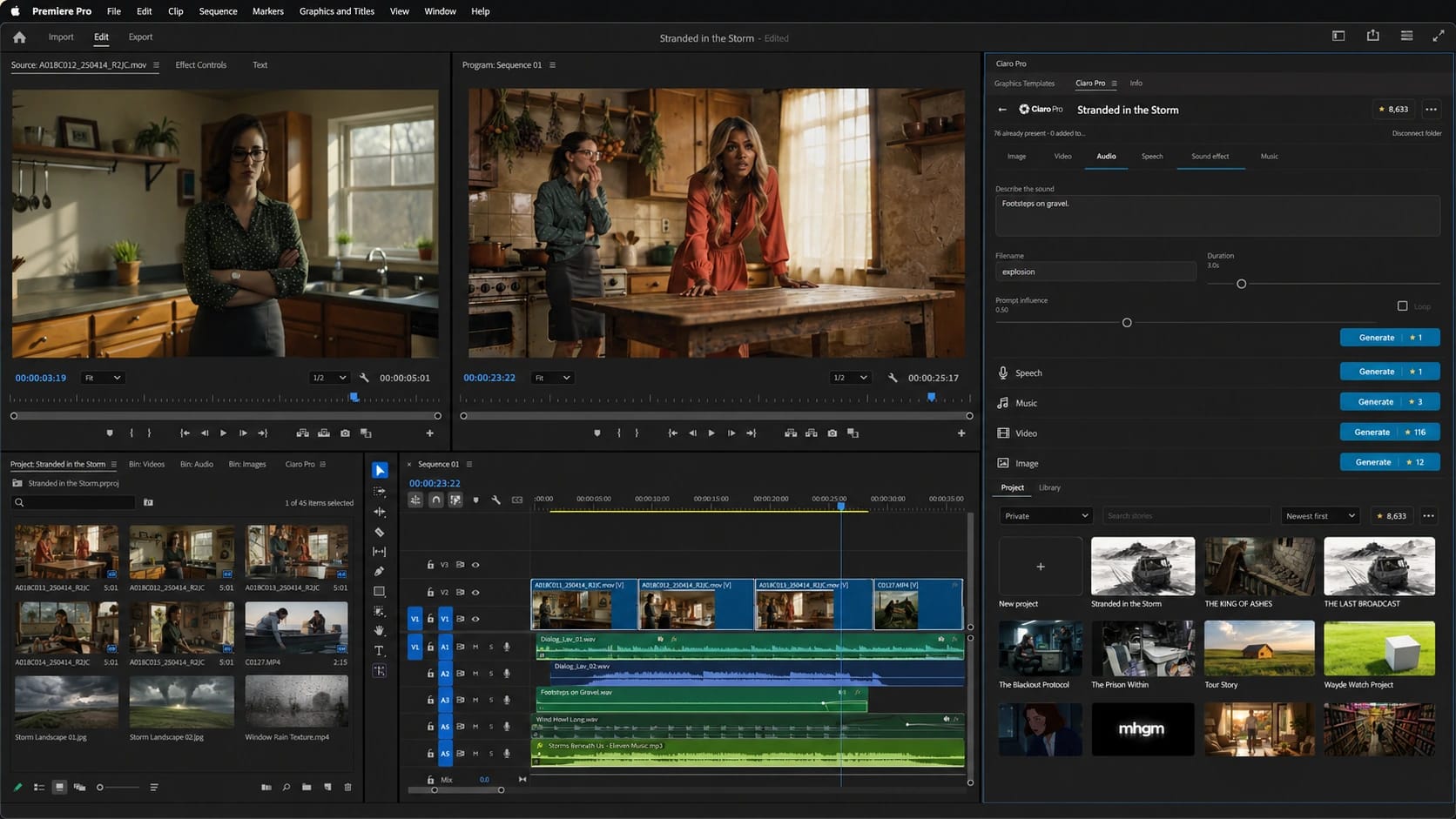
Finish in Premiere Pro
Generate the missing shot without leaving the edit.
Ciaro Pro for Premiere Pro brings image, video, speech, music, SFX, and account asset sync into the editorial workflow.
AI film continuity
Keep characters, wardrobe, locations, and assets consistent across multi-shot AI scenes.
FAQ
Common questions about AI video production software
What is AI video production software?
It combines planning, storyboards, AI video generation, media management, timeline editing, review, and export so you can deliver structured projects—not isolated files from a prompt tool.
How is Ciaro Pro different from an AI video generator?
An AI video generator creates standalone clips from prompts or uploads. Ciaro Pro ties generation to screenplay scenes, shot cards, storyboard frames, references, take review, and timeline assembly inside one production project.
Can Ciaro Pro support a full AI video production workflow?
Yes. The workflow covers script development, scene and shot planning, storyboard approval, AI video generation, asset management, timeline assembly, and export for reviewable sequences.
Is this for filmmakers or marketing teams?
Ciaro Pro is strongest for story-driven production: filmmakers, animators, agencies, studios, and teams building sequences, pilots, or episodic work where shot continuity and editorial control matter.
Can I use it for storyboard-to-video workflows?
Yes. Storyboard-to-video is a core stage: approved boards become the visual anchor for clip generation.
Produce sequences—not disconnected clips
Plan shots, approve boards, generate with context, edit sequences, and export from one production project built for professional teams.