Storyboards that still know the script
Turn scenes into shot plans and reviewable frames, then send approved boards into AI video. Ciaro Pro is storyboarding for production teams—not a gallery of prompt stills.
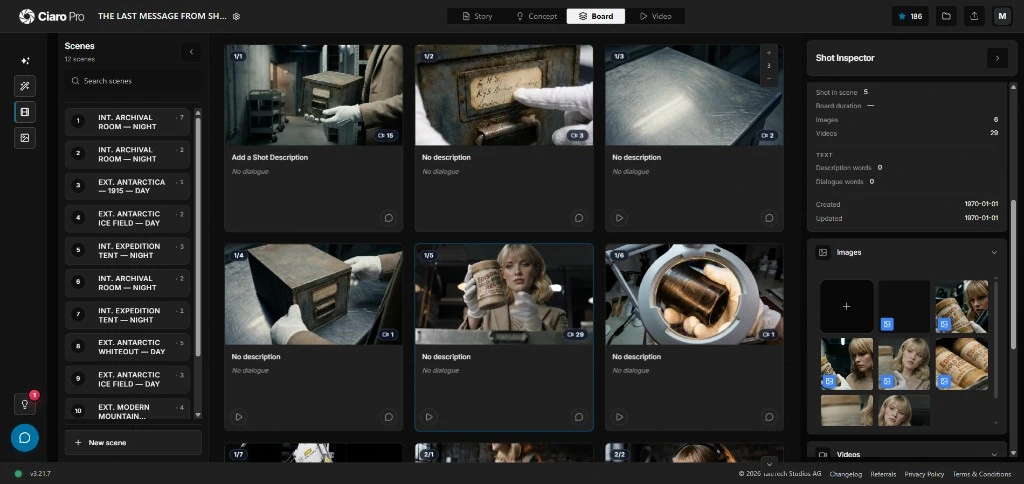
A script-linked storyboard workspace: screenplay scenes, shot cards, AI-generated boards, continuity notes, and approval status in one pre-production view.
Beyond image prompts
Professional storyboarding needs more than a frame generator
Many AI storyboard generators produce attractive stills, but pre-production teams need boards that communicate coverage, story intent, screen direction, and the next production step—not isolated concept art.
When boards detach from the screenplay, shot list, cast references, and the rest of production, teams end up with a gallery they cannot shoot, approve, or hand to generation without rebuilding context shot by shot.
Ciaro Pro keeps storyboards inside the production. Each frame stays tied to its scene, shot notes, and references—from script through boards to video and edit.
Approved boards should move straight into generation. Follow the storyboard to video AI when shots are cleared for motion.




Generate boards from the script
Use screenplay scenes and shot cards to create storyboard frames that match the production beat—not standalone prompt art.
Plan shots before pixels
Define camera intent, action, characters, and references so each board carries information reviewers can sign off before generation.
Hand off video-ready frames
Move approved boards into storyboard-to-video workflows where generated clips inherit framing, cast, and shot notes from the source frame.
Workflow
From script to approved boards—then into video
Move from screenplay to storyboard without breaking the chain between writing, shot planning, visual review, and generation.
Strong boards start with structured shot planning. Explore AI shot planning software before you generate frames from the script.
Write or import script material
Start from screenplay pages, scene outlines, or a structured brief that defines the story beat for each board.
Create shot cards
Break scenes into coverage, camera choices, character action, and production intent reviewers can approve.
Generate storyboard frames
Run AI storyboard generator workflows informed by shot context, references, and scene continuity—not generic prompts.
Review story flow
Check pacing, coverage, screen direction, and whether the board sequence supports the screenplay.
Maintain characters and worlds
Keep approved character, prop, location, and style references visible while boards iterate.
Hand boards to video generation
Use approved storyboard frames as anchors for image-to-video and AI animation workflows.
Track production status
See which shots are drafted, approved, generated, edited, or ready for export without leaving the board context.
Storyboarding toolkit
Storyboard tools built for real production
Script to storyboard AI
Scene-aware board generation
Shot cards linked to screenplay context
Storyboard generator from script workflows
Professional board review
Coverage and pacing checks
Production notes attached to frames
Approval status per shot and sequence
Continuity and references
Character and location libraries per project
Visual language carried across shots
Scene-level context for board iterations
Video-ready outputs
Boards ready for video generation
Storyboard to video AI handoff
Timeline assembly after clip approval
Who it's for
When boards need to survive past the mood board
Useful storyboarding answers practical questions: Does the sequence read? Is coverage clear? Can stakeholders sign off before you spend on generation?
Directors, producers, animators, agencies, and pitch teams use Ciaro Pro when boards are part of production—client review, previs, animation planning, and handoff to AI video, all in one project.

Continuity
Keep storyboards useful after approval
A board should not vanish after approval. Ciaro Pro keeps each frame tied to its shot card, references, generated media, and timeline placement so the storyboard remains the source of truth when takes are reviewed or regenerated.
One connected production
Script, shots, boards, generated clips, and the edit timeline
Script
Shots
Boards
Video
Timeline
A production storyboard board with approved frames, scene context, character references, video generation status, and timeline placement.
Ciaro Pro vs generators
AI storyboard software for production—not a prompt gallery
Free storyboard generators help you explore looks. They usually stop at the still. Production boards need a script link, shot plan, review status, and a clean handoff into video.
Ciaro Pro keeps storyboards inside the film production workflow so teams move from script to storyboard to AI video with fewer exports, fewer rebuilt prompts, and clearer approval gates.
For a shorter definition and comparison, read AI storyboarding software explained .
Capability
Ciaro Pro
Typical generator
Script connection
Boards remain tied to scenes
Often prompt-only
Shot planning
Coverage and camera intent included
Image-first
Review workflow
Status, notes, and sequence context
Usually gallery review
Continuity
References stay with shots
Manual and fragile
Video handoff
Storyboard to video AI workflow
Often exported elsewhere
Production fit
Built for films, pilots, and scenes
Built for one-off boards

Case study
Storyboards that lead into finished AI production
Biome Brigade Episode 1 shows why boards matter: script, storyboard planning, AI shots, and the final edit lived in one project—a four-minute episode delivered in under four weeks.
Explore next
Where this sits in Ciaro Pro
Storyboarding here leads into video from those frames, the full production workspace, and a finished episode you can watch.
Production guides
Understand the workflow before choosing a tool
Concise guides explain the production decisions behind this workflow and where each step fits.
Script to production
Move from breakdown and shot lists to storyboards, notes, and approvals without losing intent.
FAQ
Common questions about AI storyboard software
Is Ciaro Pro an AI storyboard generator?
Yes, but it is broader than a generator. Ciaro Pro connects storyboard generation with scripts, shot planning, references, video generation, and timeline editing.
Can I generate storyboards from a script?
Yes. Ciaro Pro supports script-to-storyboard AI workflows where scenes and shot cards guide storyboard frames with production context.
How is this different from free AI storyboard tools?
Free tools often create isolated frames. Ciaro Pro is for teams that need boards linked to scenes, continuity, approval, and video generation from those frames.
Can storyboards become AI video clips?
Yes. Approved frames move into storyboard-to-video AI workflows so the generated clip starts from the planned board, shot notes, and references.
Who should use AI storyboard software?
Filmmakers, animators, directors, agencies, pitch teams, and creators planning multi-shot video or animation where boards must survive review and handoff to production.
Storyboard with production discipline—then keep producing
Create boards from scripts, review shots in context, and move approved frames into video without rebuilding the plan.