Storyboard software for film, animation, and commercial production
Build, review, and manage storyboards in one connected production workspace. Ciaro Pro keeps every shot, scene, status, script reference, concept, and asset tied together for professional film, animation, and video production teams.

Overview
Every shot, scene, status, and approval in one board
The board view turns the production into a visual grid of shot cards you can sort, group, review, and approve. It is the fastest way to feel the rhythm of the story before committing to final renders or editorial handoff.
Your workspace
Customisable for studio storyboard workflows
No two productions organise a storyboard the same way. Rearrange panels, switch views, and adjust card density so directors, storyboard artists, producers, and reviewers can evaluate the work without fighting the process.
From script to storyboard
Storyboarding for film starts with the script, not a blank board
Ciaro Pro turns script to storyboard work into a connected production step. Scenes, beats, and shot ideas stay tied to the screenplay, so the board reflects the actual film, animation, or commercial you are shaping instead of becoming a separate planning document that drifts over time.
That makes storyboarding for film more useful in practice: you can review pacing, coverage, shot order, approvals, and production status while keeping the script, concepting decisions, and asset context within reach.
Storyboards are most useful when they stay inside a connected production path. See the storyboard to video AI workflow that keeps boards, generated clips, and edit linked.
Script-linked planning
Move from script to storyboard without retyping scenes or losing the intent behind each beat.
Shot order with context
Review the board as part of the wider production workflow, not as an isolated board export.
Approvals
Storyboard approval workflows producers can trust
Boards fail when status is unclear. Ciaro Pro tracks draft, in review, approved, and ready-for-production on each shot so directors, clients, and stakeholders see what changed between rounds.
Review comments stay on the card instead of scattered across PDFs and chat threads — so the next revision has a clear brief.
Visible status
See which shots block generation and which are cleared for the next stage.
Revision history
Compare rounds without losing the link back to script beats and assets.
Export & handoff
From board to production without rebuilding context
When shots are approved, the same cards carry references, notes, and script links into generation and edit. Teams do not re-enter shot intent in a separate tool.
For storyboard-to-video workflows, approved frames become the visual anchor for AI video generation inside Ciaro Pro.
See how storyboard to video AI keeps frames tied to motion generation and timeline assembly.

Your next production step
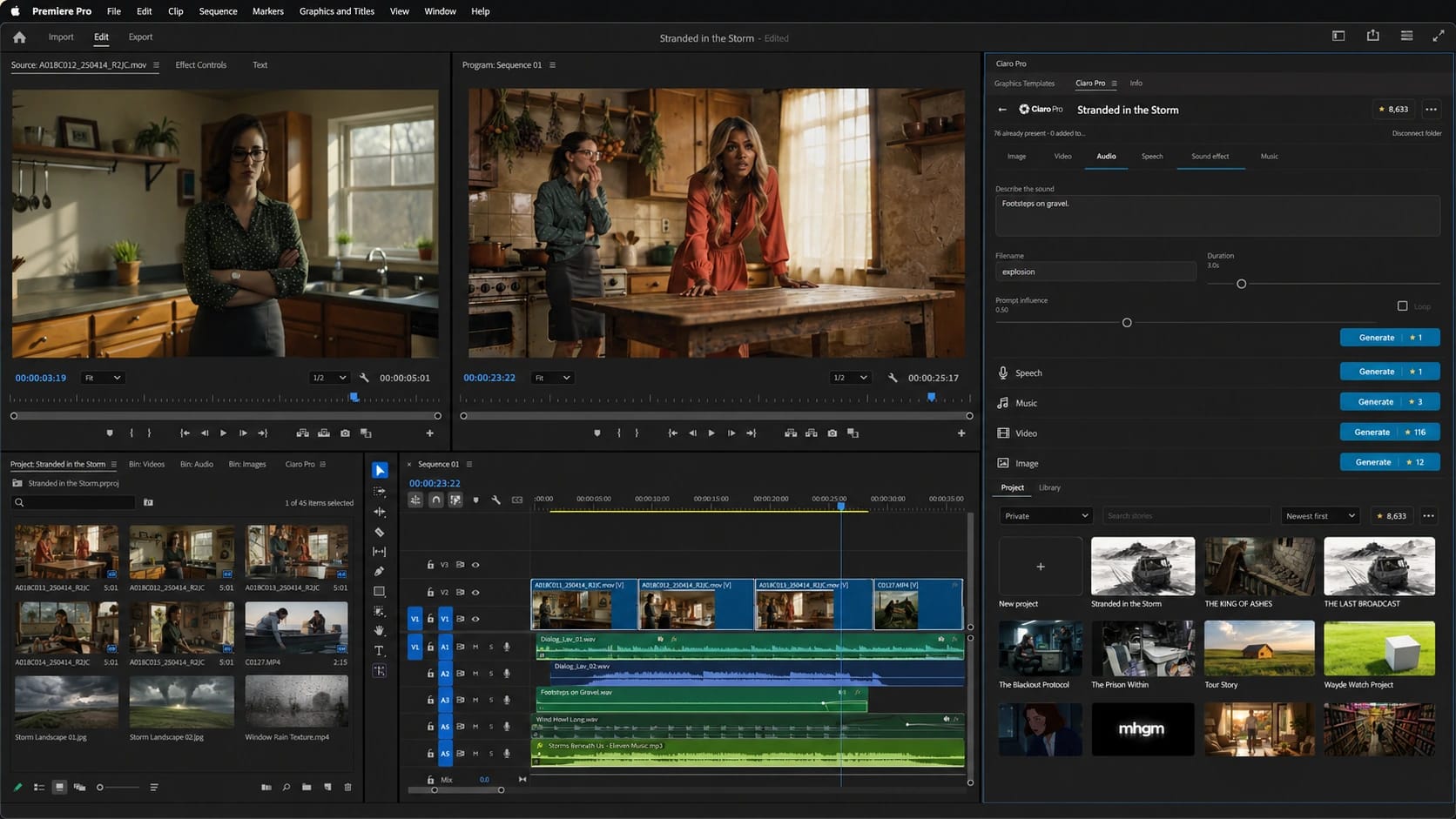
The storyboard is approved. Continue inside Premiere Pro.
Move from Ciaro Pro planning into the edit, sync available assets to bins, and generate the missing visual or sound without leaving Premiere Pro.
Professional storyboard workflow capabilities
Full storyboard overview
See every shot in the production as a card you can filter by scene, character, location, review state, or production status.
Customisable workspace
Arrange panels, resize the view, and switch layouts so the storyboard matches the way your team actually works.
Visual progress tracking
Mark shots as draft, in review, approved, or ready for production so the state of the board is obvious at a glance.
Direct concept linkage
Every storyboard card stays linked to its concept node and script scene, so context is always one click away.
Drag-and-drop reordering
Rearrange shots within a scene or move them between scenes as the rhythm of the story changes.
Annotations & notes
Add shot notes, review comments, and revision markers directly on the board instead of scattering them across tools.
Shot list alignment
Keep coverage, camera intent, and scene order visible next to the visual grid for faster director review.
Export-ready handoff
Move approved boards into generation and editorial workflows without rebuilding shot metadata.
AI Assistant
A companion while you plan and approve boards
Ask the assistant about coverage, pacing on the grid, or what to clarify before sign-off. It supports storyboard thinking inside project context — useful alongside the dedicated storyboard software category page.
AI Assistant for boards and scriptsQuestions about storyboard software
- How is this different from AI storyboard software?
- This feature page covers the in-app board workflow. The AI storyboard software page compares category tools and commercial intent for teams evaluating vendors.
- Does the board stay linked to the script?
- Yes. Scenes, beats, and shot cards stay connected to screenplay content so the board reflects the film you are making.
- Can we track approvals per shot?
- Yes. Status labels and notes on each card make review rounds explicit before generation spend.
- What happens after approval?
- Approved shots feed visual generation, storyboard-to-video workflows, and timeline assembly without retyping shot intent.
Proof
Boards that held through Biome Brigade Episode 01
The episode moved from script-linked boards through generation and edit on one path — useful proof that the board is part of production, not a throwaway PDF.
View case studyScript to production
Move from breakdown and shot lists to storyboards, notes, and approvals without losing intent.
Help Center
How to in Ciaro Pro
Step-by-step guides for the workflows on this page — from first click to finished output.
Next
Keep going from here
More on storyboards, generation, and finishing—chosen for the page you are on.