What Is a Shot List?
A shot list is a complete roadmap and checklist that details every camera shot needed for a film, video, or commercial shoot. For each setup it records scene, shot number, framing (wide, medium, close-up), camera angle, lens or focal length, movement, subject action, audio notes, and any special equipment. Directors, cinematographers, and assistant directors use it to organize coverage, protect schedule, and keep the crew aligned—so nothing essential is missed on set.

Definition
Shot list, defined
Unlike a screenplay (story) or a storyboard (visual design), a shot list is operational: it tells the camera team what to capture, in what order, and with which technical parameters. It often grows out of a script breakdown and approved boards, then becomes the day-of shooting reference alongside the schedule and call sheet.
Modern shot lists may live in spreadsheets, production apps, or AI filmmaking workspaces that keep shot metadata linked to script scenes, boards, and generated tests—so planning and execution share one source of truth.
Shot lists usually follow a script breakdown that tags cast, props, locations, and other scene requirements.
Definition
A shot list is a structured inventory of every camera setup required for a scene or project, specifying framing, angle, movement, action, and gear so production can shoot efficiently and completely.
How it works
How do you make a shot list?
A useful shot list turns creative coverage into numbered, shootable setups the crew can execute.
Start from scenes and coverage intent
Use the script and breakdown to list scenes, then decide which beats need wide, medium, close-up, insert, or POV coverage.
Define each setup
Assign shot number, framing, camera angle, lens, movement (static, pan, dolly, handheld), subject action, and dialogue or audio notes.
Add equipment and complexity flags
Note steadicam, crane, VFX plates, lighting resets, or special rigs so the AD and DP can budget time.
Order for efficiency
Group by location, lighting setup, or camera direction—not always story order—to minimize resets on set.
Share and revise with the crew
Director, cinematographer, and AD align on priorities; boards or animatics may refine framing before the list locks.
Benefits
Why productions use shot lists
Protect coverage
Every essential insert, reaction, and establishing shot is written down before the day runs out.
Save set time
Clear setups and gear notes reduce mid-shoot debate and help the AD keep the schedule honest.
Align camera and editorial
Editors inherit intended coverage; missing plates and mismatched eyelines are caught earlier.
Coordinate departments
Lighting, sound, VFX, and art know which setups need special prep without re-reading the whole script.
Bridge boards to generation
In AI pipelines, each listed shot can map to a board frame, reference, or generated clip with stable metadata.
Workflow example
From scene beat to shootable setups
A dialogue scene becomes a shot list when coverage choices are numbered, framed, and ordered for the floor.
- 1
Mark the beats
Entrance, confrontation, reveal, and exit each need intentional coverage—not one locked-off wide for everything.
- 2
Assign shot numbers
Scene 12A–12F (or 12-1 through 12-6) list master, over-shoulders, close-ups, and a prop insert.
- 3
Specify technical notes
35mm medium, slight push-in on the reveal; 85mm close-up for the reaction; boom vs lav notes if relevant.
- 4
Reorder for the set
Shoot all A-camera direction shots before flipping; schedule the insert while the lighting reset happens.
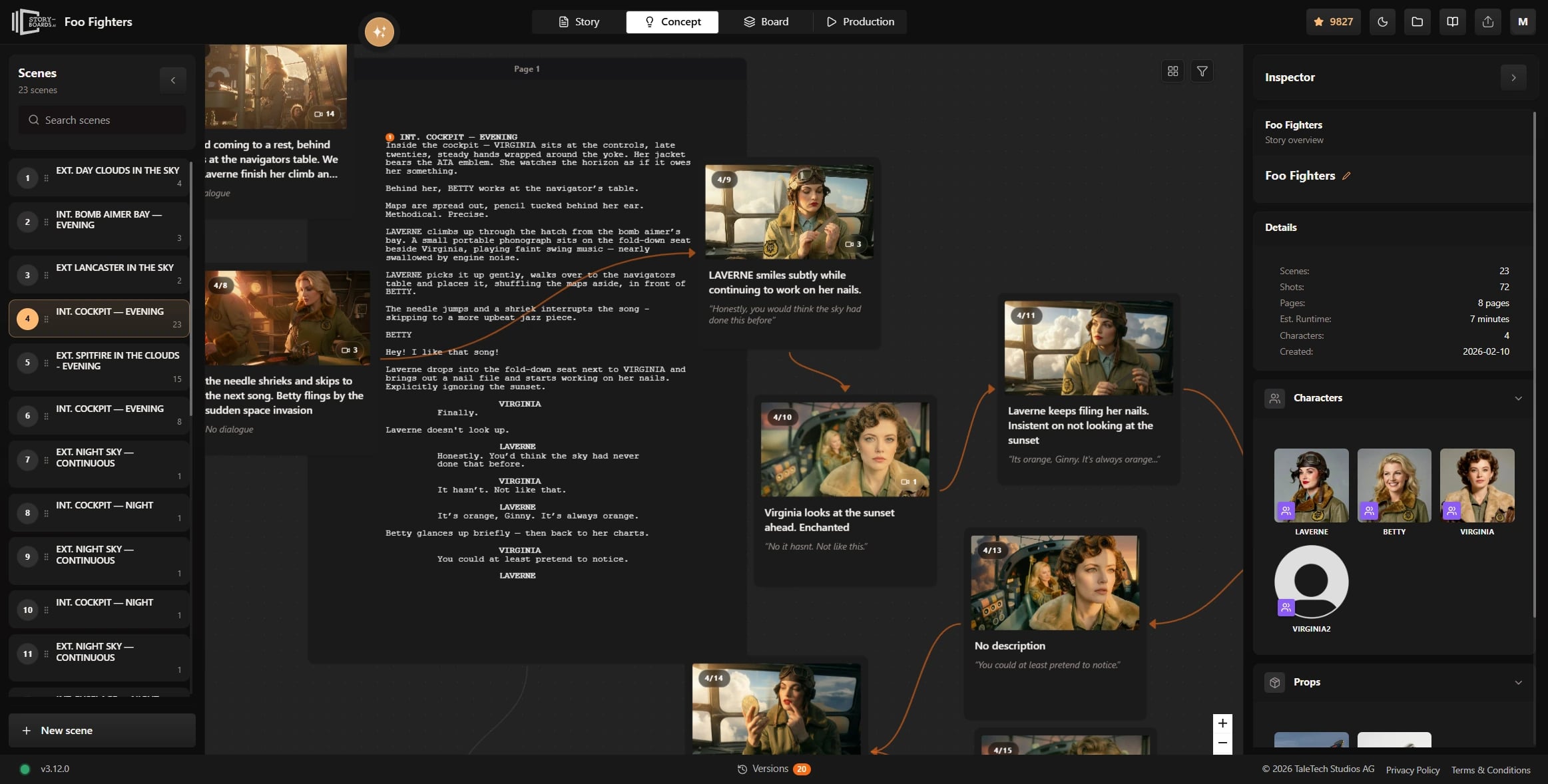
Visualize those setups first with a script to storyboard workflow, then lock the shootable list.
Comparison
Shot list vs storyboard vs animatic
These tools answer different pre-production questions and work best together.
Format
Best for
Typical limitation
Shot list
Operational coverage: what to shoot, framing, gear, order
Little visual design without boards or references
Storyboard
Shot design, composition, continuity, and visual intent
No inherent schedule, gear checklist, or shoot order
Animatic
Pacing, rhythm, temp audio, and timed editorial feel
Not a day-of camera checklist for the crew
Script breakdown
Cast, props, locations, and department requirements per scene
Does not specify individual camera setups
Use cases
When do you need a shot list?
Protect complex coverage
Multi-character scenes, action, and limited locations need explicit setups so nothing critical is skipped.
Client-aligned setups
Agencies and DPs share a numbered list of hero product shots, lifestyle coverage, and B-roll before the shoot day.
Schedule and call-sheet fidelity
Shot counts and complexity inform page counts, company moves, and realistic day-out-of-days planning.
Governed generation per setup
Each listed shot becomes a promptable unit with board, character, and camera metadata attached.
Proof
Coverage you can sign off
A shot list is the production order of what you will shoot or generate: camera, action, and why the shot exists. It is not a storyboard. Boards show the frame; the list says what happens next.
Order
Shot sequence for a scene or day
Intent
Camera, action, and coverage notes
Handoff
Feeds boards, then generation
Review
Stakeholders sign off before you spend
FAQ
Frequently asked questions
What's the difference between a storyboard and a shot list?
A storyboard shows how each shot should look—composition, staging, and visual continuity—usually as drawn or generated frames. A shot list is the production checklist: shot numbers, framing labels, angles, lenses, movement, action, and gear. Boards answer “what does it look like?”; the list answers “what do we shoot, and how?” Most crews use both: boards for creative approval, the shot list for set execution.
What does a shot list look like?
Typically a table or structured document with columns such as scene number, shot number, shot size (WS/MS/CU), camera angle, lens, movement, description of action or dialogue, audio notes, and equipment. Rows are ordered for shooting efficiency. Some teams add thumbnails from the storyboard; others keep the list text-only and attach boards separately in tools like StudioBinder or a shared production workspace.
Who prepares a shot list?
Often the director drafts coverage intent, while the cinematographer refines technical details (lens, lighting complexity, camera support). The assistant director uses the list for scheduling and on-set pacing. On smaller or AI-led productions, one filmmaker may own the full list. Resources from StudioBinder, TechSmith, and Vimeo describe similar director–DP–AD collaboration patterns.
How do you do a shot list?
Break the script into scenes, decide coverage for each beat, number every setup, and fill framing, angle, movement, action, and gear. Cross-check against storyboards or an animatic so visual intent matches shootable setups. Reorder for locations and lighting efficiency, then share with DP and AD for time estimates. Revise after tech scout or when boards change—locking the list before call sheets go out.
Explore next
Related answers and features
Shot lists sit between breakdown, boards, and on-set or AI execution.
Plan coverage, then shoot or generate with intent
Use Ciaro Pro to keep script scenes, shot planning, and storyboards connected—so every setup on the list maps to clear visual intent.